



How to replace led tv backlight
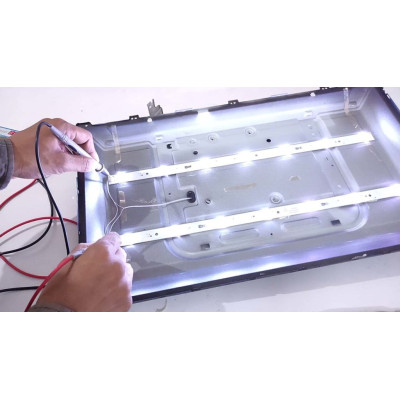
Replacing the backlight on an LED TV can be a complex task and may require professional assistance. However, if you're comfortable working with electronics and have the necessary tools, you can attempt to replace the LED backlight yourself. Here's a general guide to help you get started:
Safety first: Before working on any electronic device, make sure it is unplugged from the power source to avoid any electrical accidents.
Disassemble the TV: Remove the back cover of the TV carefully using a screwdriver or the appropriate tools. Take note of the screw placements and keep them organized to ensure easy reassembly.
2.1 Open the front frame of the TV and separate the LCD screen: In some cases, to access the backlight strips, you may need to detach the front frame of the TV. This process can vary depending on the TV model. However, it's important to note that the LCD screen is extremely sensitive and fragile. Mishandling or applying excessive pressure can cause the screen to crack or shatter, resulting in permanent damage. If you are unsure about this step or lack experience working with delicate components, it's strongly advised to seek the assistance of a professional technician who has the necessary skills and tools to handle the LCD screen properly.
Remember, working with electronics requires caution and precision. If you're not confident in your abilities, it's always best to seek professional help to ensure the safety of your TV and yourself.
Locate the backlight: Once the back cover is removed, you will find a series of thin LED strips positioned along the edges of the display panel. These strips are the backlighting components that need to be replaced.
Remove the old backlight: Gently detach the connectors that connect the backlight strips to the TV's circuit board. Take note of how they are connected for reassembly. Carefully remove the old backlight strips from the TV. Be cautious as they can be fragile.
Purchase a replacement backlight: Contact the TV manufacturer or a reputable electronics parts supplier to obtain the correct replacement backlight strips for your specific TV model. Ensure they match the specifications of the original backlight.
Install the new backlight: Align the new backlight strips along the edges of the display panel, matching the orientation of the original strips. Carefully connect the strips to the TV's circuit board, making sure they are securely attached.
Test the TV: Reconnect the TV to the power source and turn it on to verify if the new backlight is functioning properly. Observe the screen for uniform brightness and any potential issues.
Reassemble the TV: Once you are satisfied with the replacement, carefully reattach the back cover of the TV using the screws in their original positions.
If you are unsure about any step or lack the necessary experience, it's highly recommended to seek professional help. Opening up an electronic device like a TV can be complex and delicate, and improper handling may cause further damage.
Leave a Comment